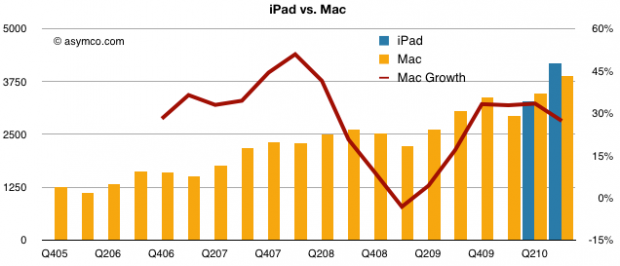
It has been a good while since looking at how I’ve been getting along with my iPad, and there has been some changes since that piece about not having books on my iPad. Here are some things that I’m doing right now with my iPad:
Reading, Reading, and Reading
As I said then, and have often talked about on Twitter, I use my iPad primarly for reading. There are two silos in which I do this reading, the Mobile Safari web browser and the Amazon Kindle application. In respect to Safari, I am in places such as websites and Google Reader. There’s a lot that happens in Google Reader.
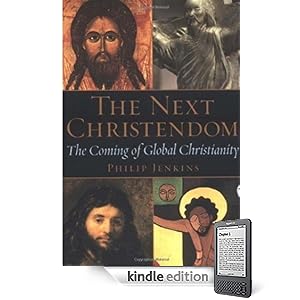 The Amazon Kindle application has been both good and bad. Good in the respect that it is no more complicated to read there than it would be in a browser. Bad in that I’ve really had to figure out what electronic texts actually work best from the vantage point of the Kindle application/service. For example, I’ve got handle on looking at Kindle for reference books, but for the longer-form non-fiction reads (currently reading Philip Jenkins’s The Next Christendom: The Coming of Global Christianity), I am up and down about purchasing them via Kindle. These are the kinds of books that normally I’ll reference and/or lend out, and there just aren’t enough people around me with a Kindle or lendable electronic book platform to do this with.
Collaborating and (Nearly) Creating
One of the experiments that seems to be going ok in some areas, and not so well in others is this idea of using the iPad as a collaborative platform. In this respect, I am using my iPad for several projects that I/MMM am working on.
For one project, I am using the iPad as a project management and research assistant. To this end, I’m learning how to use GoodReader, Evernote, Dropbox, and Google Docs in a synchronous relationship. GoodReader and DropBox help me deal with issues of file transfer and managing paperless PDFs (yea for that). Evernote plays the role of a notepad and really comes close to what I think a document management app should look like for the iPad. What it is missing in terms of collaboration, Google Docs takes up – though I’m more just in a reading mode with all but the spreadsheets end of things for now.
For another project, I’ve been using the iPad for speaker/presenter notes, and soon will be using it more in concert with my mobile to do the entire presentation.
The Social Networking Secretary
Part of making sure that MMM is abreast of data and opportunity means staying attuned to a few social networking sites. There’s the Twitter client on mine to handle that aspect, and then I use websites to handle the rest. What is neat is that I now have this flow where I get a notification on my mobile about something (LinkedIn/Twitter add, etc.) and if I am resting, I don’t pick up the phone to see what it is, I just move over to that section on the iPad and look at it there.
At the same time, there’s notable fatigue that I get in using social networks on the iPad, so I’m never there very long before moving off those apps/sites and onto something a bit better. Flipboard has been a revelation (I could see a picture bible using this format) and has really helped me to look into other topics that will eventually be areas that mobile ministry efforts will have to address.
Digging in the Word
In respect to the Bible, I have mostly stuck with YouVersion. Mainly because I’ve not had a need to do any in-depth studies, and also that the general interface of YouVersion works well when I’m sharing the reading with other people. I only use a few translations when doing readings, and connectivity doesn’t matter as much (yea, I need to share more notes and bookmarks, I’ll get there).
I have recently downloaded Logos’s Bible Reader for iPad. Am a lot late in checking it out, but I needed to know why I’d need to look at another Bible reader and a moment came up where I needed more. I needed to do some contextual lookups of a statement made by a minor prophet and this wasn’t possible in the other Bible reader. Therefore, I’m in the midst of checking out Logos. I’ll have some fuller impressions in a few weeks, but so far, I like how well its tuned to studying the text – besides just reading. But, if you choose to read, the way in which the UI gets out of the way is awesome.
I’d still like to see something like an Evernote-plugin that could take my notes from Evernote and link them to a Bible reader/service. I write a lot of reflections, and being able to start at the reference, and then link into the application would be something very innovative. I get that we use the same behavioral metaphors for digital bibles, but they aren’t yet taking advantage of the digital paradigm enough for me.
Evangelism’s Weird Leanings
The iPad is weird. I’ve entertained two very different sides of discussions since having one. There is the side of people who see it as a magical device – they are impressed at how easy it is to use and how hard normal PCs look and act like after playing with it. To these folks, it causes conflicting thoughts as well, because as the iPad is neat, some have admitted that it makes computer technology seem even more idolatrous than ever before (touching the digital versus having a layer between you and digital with the traditional paradigm).
The other side of conversations have been those people who see the iPad (and its iPhone forbearer) as primarily a Western/developed-nation experience. This is true to some degree, but the larger picture is being missed. The iPad, as with smartphones before, are a technology that doesn’t need legacy computer leanings to find relevance. The speed at which the world has moved to touch-gesture interfaces as normal versus one-off is something being felt everywhere. No, we don’t have iPads (yet) in the price range that makes this accessible, but we do have the need to have content on those iPads disrupting industries such that we are seeing this trickle down and across to other technologies.

In both cases, there’s this pull to at least see what’s possible. Most people see this space as something that won’t last long (and it might not). But there’s a challenge to the way things had been done, and a reluctance on my part to want to go back to the way things were. Certain types of friction aren’t needed, and with the iPad, doing computing easier seems to speak to people differently than even using my mobile has.
Having the iPad has in a sense turned me more into a person that pays attention to the implications of mobile and connected technologies and how we are sending and receiving Christ in these changing times. Surely, not everything will be answerable, but as we all use these more, we come up to challenges and work through them with the hope that what we learn will filter into ways that we can enable the Body to take advantage of these tools.
At least, that’s how I look at using this tech. I’ve got a lot of learning to go.

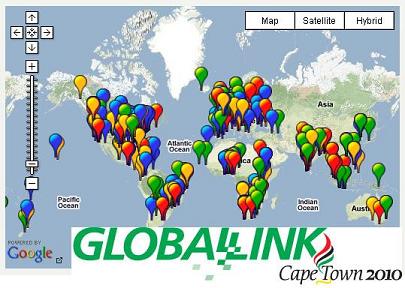 Got some timely (really) updates for you concerning the after-sessions happening in Charlotte related to the
  Antioch Baptist Church
 Stories like this I like. CNN Labs
  There are two parts of Kansas: the east and the west. The east in more populated and therefore has met and embraced the 21st Century. The west part of Kansas, is different. It is easy to suggest many of the things I have experienced personally in a more rapidly moving community, yet the reality is that those are just not going to happen yet. I have been to churches that have websites with services available on